
Cloudflare Outage Analysis (Feb 20, 2026): Connectivity Issues, 403 Errors, and Workers AI 429 Spikes
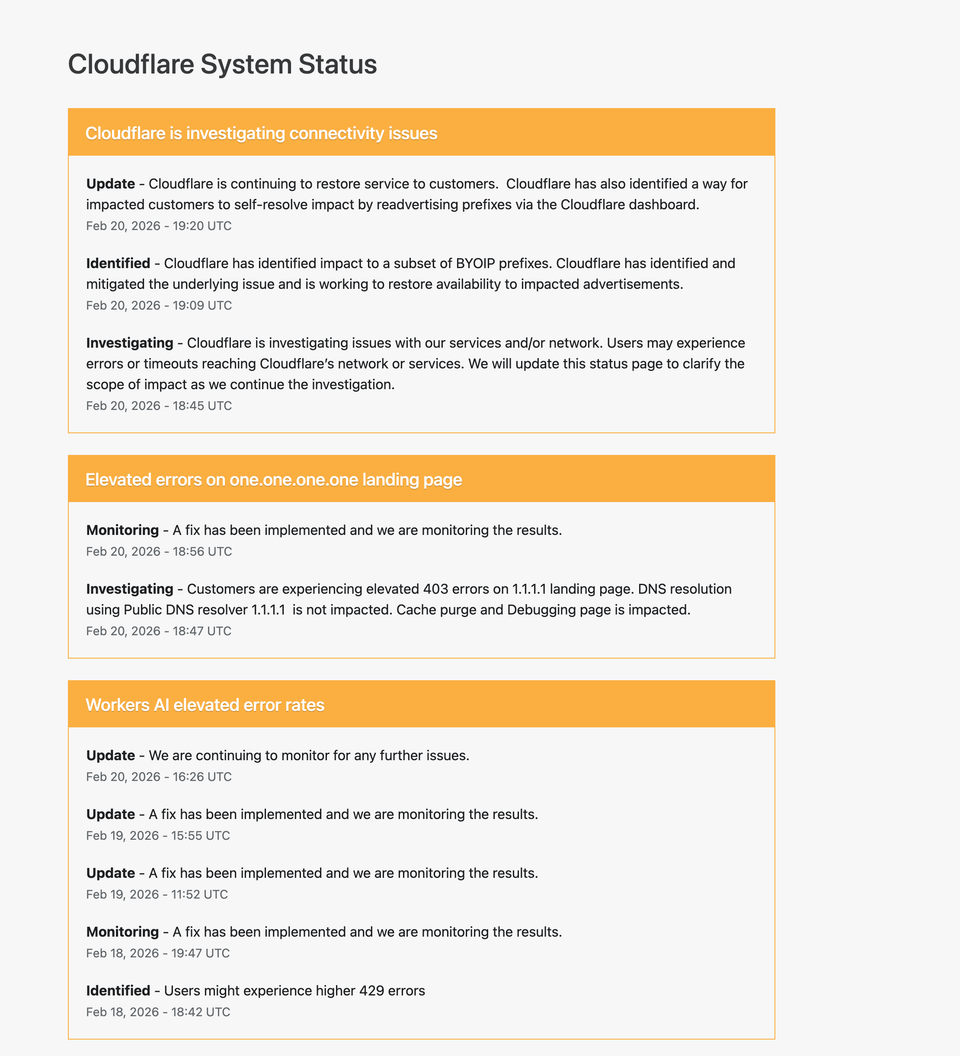
On February 20, 2026, Cloudflare reported multiple service disruptions affecting connectivity, landing page access for 1.1.1.1, and elevated error rates in Workers AI. While not all core services were fully down, users experienced timeouts, HTTP 403 responses, and HTTP 429 rate limit errors.
This article provides a complete technical breakdown of:
- What happened
- Which services were affected
- Why specific HTTP errors occurred
- The networking layer implications
- Lessons for DevOps and infrastructure engineers
- How to diagnose similar issues in your own environment
Incident Overview
Cloudflare reported three primary issues:
- Connectivity issues affecting a subset of BYOIP prefixes
- Elevated 403 errors on the 1.1.1.1 landing page
- Workers AI elevated 429 error rates
Each incident had a different root cause and impact layer.
1. Connectivity Issues and BYOIP Prefix Impact
What Happened?
Cloudflare identified impact to a subset of BYOIP (Bring Your Own IP) prefixes. The company mitigated the underlying issue and advised impacted customers to re-advertise prefixes via the dashboard.
Users may have experienced:
- Timeouts
- Routing failures
- Inability to reach certain services
- Intermittent packet loss
What Is BYOIP?
BYOIP allows customers to use their own IP address ranges while leveraging Cloudflare’s global network.
This means:
- The customer owns the IP block
- Cloudflare announces (advertises) it via BGP
- Traffic flows through Cloudflare’s edge
If prefix advertisement fails or becomes inconsistent, routing problems occur.
Why Prefix Advertisement Matters
Cloudflare relies on BGP (Border Gateway Protocol) to announce IP prefixes across the internet.
If:
- A prefix is withdrawn
- An advertisement becomes inconsistent
- A route propagation issue occurs
Then traffic destined for that prefix may:
- Blackhole
- Route incorrectly
- Timeout entirely
Likely Technical Scenario
While full internal details were not disclosed, typical causes include:
- Route dampening
- Incorrect BGP attributes
- Edge propagation delay
- Partial prefix withdrawal
Because only a subset of BYOIP prefixes were affected, this suggests a targeted advertisement inconsistency rather than a full global routing failure.
How to Diagnose Similar Issues
If you suspect prefix routing issues:
Check BGP announcements:
whois <IP>
Use route views:
https://bgp.he.net/
Test connectivity:
traceroute <IP>mtr <IP>
Validate DNS resolution:
dig yourdomain.com
If DNS resolves but traffic times out, suspect routing layer problems.
2. Elevated 403 Errors on 1.1.1.1 Landing Page
Important Clarification
Cloudflare stated:
DNS resolution using Public DNS resolver 1.1.1.1 is not impacted.
This is critical.
The DNS service remained operational.
The landing page returned elevated 403 errors.
Why a Landing Page Can Fail While DNS Works
- DNS resolver service runs separately
- The web landing page is an HTTP service
- CDN caching and access control policies apply to HTTP layer
Thus:
- DNS (UDP/TCP port 53) may function
- HTTPS landing page may return 403
What Does HTTP 403 Mean?
403 = Forbidden.
Possible causes:
- WAF rule triggered
- Access policy misconfiguration
- Origin permission problem
- Edge misrouting
- Cache configuration error
Since Cloudflare mentioned cache purge and debugging page impact, this suggests:
- Edge configuration issue
- Cache invalidation inconsistency
- Possibly permission scope misalignment
How to Reproduce / Diagnose 403 Errors
curl -I https://1.1.1.1
Look for:
- Server headers
- CF-Ray header
- CF-Cache-Status
- Response time
Compare behavior from multiple regions.
Operational Insight
This type of issue highlights separation between:
- Network layer
- Application layer
- DNS layer
- Edge cache layer
Understanding these layers prevents false assumptions during incidents.
3. Workers AI Elevated 429 Error Rates
What Happened?
Users experienced higher 429 errors when using Workers AI.
429 = Too Many Requests.
This indicates rate limiting.
Why 429 Happens
Possible causes:
- Sudden traffic spike
- AI model resource saturation
- Token limit exhaustion
- Regional compute imbalance
- Auto-scaling delay
AI workloads are bursty and GPU-bound. If demand exceeds scaling capacity, rate limiting protects the system.
Understanding 429 in Depth
Typical 429 response includes:
Retry-After: <seconds>
This header indicates when to retry.
Well-designed clients should:
- Implement exponential backoff
- Respect retry-after
- Avoid aggressive retry storms
Diagnosing 429 Issues
curl -I https://api.example.com
Check:
- Retry-After header
- Response latency
- Region consistency
If 429 spikes coincide with:
- Product launches
- AI feature rollouts
- High compute bursts
Then capacity planning needs adjustment.
Timeline Analysis
The incident lifecycle followed this pattern:
- Investigating
- Identified
- Mitigated
- Monitoring
This is standard SRE incident management flow.
Architectural Lessons
1. Separation of Layers Matters
DNS availability does not equal HTTP availability.
Routing availability does not equal application availability.
Engineers must isolate:
- L3 (Network)
- L4 (Transport)
- L7 (Application)
2. BYOIP Adds Complexity
While powerful, BYOIP introduces:
- Additional BGP dependencies
- Propagation risks
- Edge advertisement responsibility
Organizations using BYOIP must:
- Monitor prefix visibility
- Use multi-vendor route validation
- Set up BGP alerting
3. Rate Limiting Is Protection, Not Failure
429 errors often mean:
The system is protecting itself.
But:
- Poor client retry design can worsen incidents
- Retry storms amplify load
- Backoff logic must be implemented correctly
DevOps Playbook: What To Do During Similar Incidents
Step 1: Validate DNS
dig domain.com
Step 2: Test TCP Connectivity
nc -zv domain.com 443
Step 3: Check HTTP Layer
curl -I https://domain.com
Step 4: Compare Multiple Regions
Use:
- VPN
- Remote monitoring nodes
- Cloud VMs in different regions
Was This a Major Outage?
No full global DNS failure occurred.
However:
- Subset routing issues
- HTTP access disruptions
- AI service rate limiting
These represent partial service degradation.
Modern infrastructure rarely fails completely. It degrades in layers.
Understanding partial degradation is critical for modern engineers.
Strategic Takeaways for Infrastructure Teams
- Monitor BGP announcements continuously
- Separate DNS health from HTTP health monitoring
- Implement robust rate limiting observability
- Use synthetic monitoring from multiple continents
- Document incident timelines thoroughly
Final Thoughts
This incident demonstrates how modern cloud infrastructure failures are rarely binary.
Instead, they involve:
- Prefix advertisement complexity
- Layered service architecture
- Rate limiting safeguards
- Cache and edge configuration subtleties
For engineers building on global networks, the key lesson is:
You must think in layers.
Routing.
DNS.
Edge.
Application.
AI compute.
Each layer can fail independently.
And diagnosing them requires disciplined isolation.